SSB Project Resource Hub
You’ve been approved for a SSB Bursary. Now what?
Congratulations on your successful application, and welcome to the Summer Student Farm, Food and Fisheries Bursary Project Resource Hub.
Implement your project like a pro, with our guides, templates and more!
Here, you will find a step-by-step outline of your responsibilities as a Bursary Recipient and all of the information needed to successfully manage your project. If you still have questions after reviewing the content of this resource, please don’t hesitate to contact the IAF Team.
Electronic Funds Transfer
Project payments are made via Electronic Funds Transfer (EFT). To set up your EFT:
- Navigate to the “CONTACTS” heading on the grey Toolbar on the left side of the Client Portal. Click the subheading “People.” If hidden, click the arrow beside “CONTACTS” to reveal the three subheadings.
- Your name will appear in the space to the right of the Toolbar. In that space, choose the relevant Organization whose EFT information you want to register.
- On the Contact, scroll down to the EFT Information section.
- Click the green + icon to the right of the heading “Bank Accounts.” This will open a pop-up window labeled “Add a Bank Account.” In that pop-up, please provide the requested banking information, and click “Save“. Your newly created account will appear in the “Bank Accounts” section directly below the EFT Information section.
- Beneath “Bank Accounts,” click the newly created account. A pop up will appear.
- Click the green + icon to the right of the heading “Supporting Document Upload.” This will open a document upload pop-up. Please upload a copy of a void cheque or bank-supplied direct deposit form.
- At the bottom-right corner of the window, click “Save”.
If you have any questions about EFT or if you’re unable to set up your EFT, please contact finance@iafbc.ca.
Locating Your Banking Information
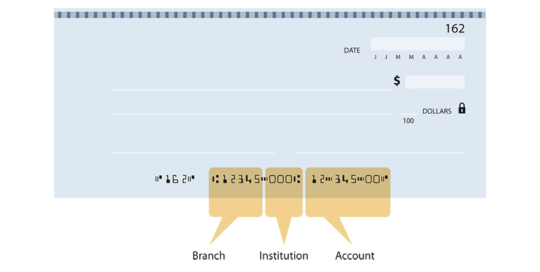
Your banking account information is found on the bottom of a void cheque. You will see a set of five numbers (the Branch/Transit number), a set of three numbers (the Institution Number), followed by a longer number (the Account Number). An image is provided to the right to assist you in locating these numbers.
If you do not have physical cheques, this information is accessible through most online banking applications. Simply select your account and look for an option to download a void cheque. Your bank is also able to provide you with these numbers at the teller.
Reporting
All reporting is done via the IAF Client Portal.
When your reports are ready, you will receive an email with directions.
To complete or review a report, click the Report card on the left side of the IAF Client Portal and navigate to the relevant project or report.
Watch the video to learn the reporting basics.
Funding Acknowledgment
What is Funding Acknowledgement?
Funding acknowledgement is exactly what is sounds like, acknowledging the funders that are making your project possible. It’s important to the program funders that funding is appropriately acknowledged, and credit given on any public communications.
Not all projects produce materials that require funding acknowledgement, but if you make a social media post, newsletter update, media release, or other public project communications, the material must be submitted in advance of publication for review and approval. This includes any reports or publications you may complete. Not sure if you need to submit something? Contact communications@iafbc.ca for clarification.
Communications materials must be submitted to the IAF Client Portal at least 10 days prior to being needed. The approval is granted by the Ministry of Agriculture and Food, with the process being facilitated by IAF.
For a downloadable PDF of the funding acknowledgement requirements, see the resources section.
Funding Acknowledgement Process
Design
Design project materials, include appropriate logos and/or credit line.
Submit
Submit your materials to IAF through the client portal at least 10 days in advance. IAF submits to funder for review.
Feedback
IAF will provide you with the feedback received from the funders. If required, you may need to edit your material and re-submit for approval.
Approval
Once the material has been approved by the funder IAF will notify you to confirm that the material is approved for use.
Distribute
Once the approval has been given, you’re free to use the materials.
Funding Acknowledgement Requirements
Funding acknowledgements typically include logos (graphic identifiers), a credit line (written statement), and a disclaimer statement. Typically, the acknowledgement appears near the front of a report or publication, at the bottom of the table of contents, on an acknowledgement page or similar.
You must submit proofs of all communications materials in advance of being made public to IAF’s Communications Team. The communications team is here to help with questions about requirements for each type of material.
Reminder: All materials require approval by IAF prior to printing/production/distribution.
General rule: Logos must appear on communication materials. If it’s a report or publication you may also need a credit line and/or disclaimer statement. When using a government logo you must complete a third-party use form. There are also extra things to be added if the materials is going on social media.
- Logos
- Credit Line
- Disclaimer
- Social Media
- Videos & Presentations
- Reports & Publications
- Public Announcements
The logos (aka. Graphic Identifiers) must be used on the majority of communication materials. This includes newsletters, event invitations, press releases, announcements, public reports, advertisements, flyers, posters, brochures, and related communication materials.
Whenever the Province’s logo appears, the user must also complete and submit a Third-Party Use form for approval. This should accompany all materials submitted for approval that contain the Province of BC’s logo.

Need the logos? Please refer to the resources section below. There you will find a link to download a .zip file with a variety of logos you may require. If you are unable to download a .zip file, please contact the Comms Team and we’ll forward you the logos.
In addition to the logos, the credit line should also be included in reports and other publications.
For brochures, posters, or displays, a written statements may not be required. The Comms Team can clarify prior to development, or upon submission of materials for approval.
Credit Line:
This [Project, Report, Presentation] was funded by the Government of Canada and the Province of British Columbia through the Agriculture Workforce Development Initiative. The initiative is delivered by the Investment Agriculture Foundation of BC.
Disclaimers statements are required in reports and other publications, especially when they contain recommendations and opinions. Typically, we recommend this statement appears near the front of a report or publication, at the bottom of an acknowledgement page, with the logos and credit statement at the end of a video, or similar.
Disclaimer statement:
Opinions expressed in this [report, publication, etc.] are those of [organization name, the authors, etc.] and not necessarily those of the Government of Canada and the Province of British Columbia.
We understand you may be interested in sharing your project funding or details on your social media accounts. This action constitutes a ‘public announcement’ and requires advanced approval. Contact the Communications Team for additional details on project communications via social media.
Please submit ALL social media content relating to your project to the IAF Client Portal prior to posting for approval. If you will be doing many social posts, please contact us and we will work with you to approve a social media campaign, rather than every individual post.
You are required to have the Logos, Credit Line, and Disclaimer in your video or presentation. The three components should be on a single acknowledgement slide at the end or beginning of your video or presentation.
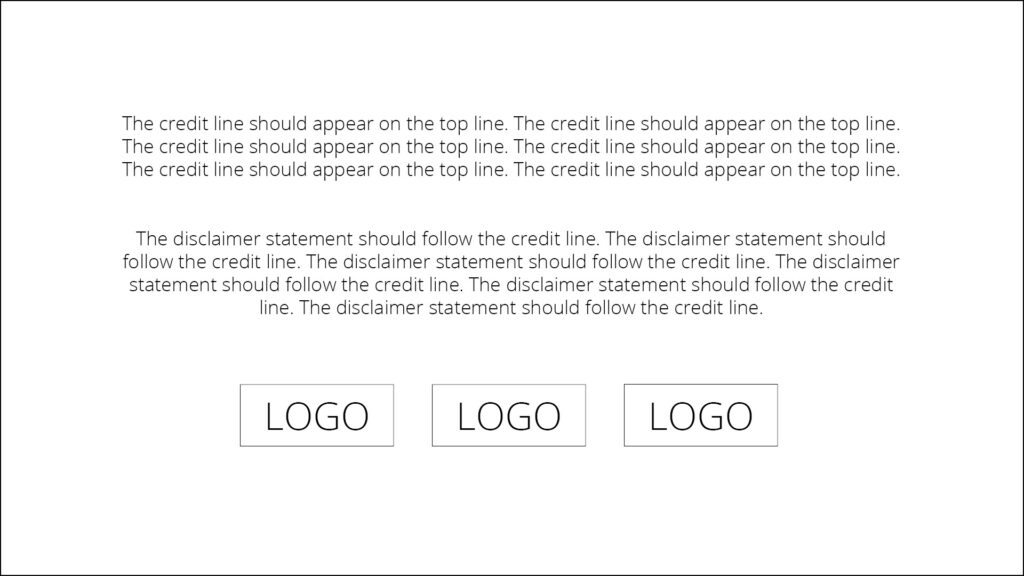
You are required to have the Logos, Credit Line, and Disclaimer in reports and publications. In select cases the logos may be omitted due to space or formatting requirements. If you have questions about how to acknowledge funding on your materials, please reach out early to IAF Communications.
For most reports and publications, a funding acknowledgement page is included near the beginning of a report. This will contain the credit line, disclaimer, and logos.
An event or project announcement is considered a ‘public announcement’ and requires advanced approval. All event material should be submitted together as one approval. This may include an event poster, a registration page, and social media posts.
Announcements such as news releases should be submitted as early as possible. Our funders require additional time to review announcements, especially if you are requesting a quote.
Resources