
CAF Project Resource Hub
You’ve been approved for CAF Funding. Now what?
Congratulations on your successful application, and welcome to the Climate Agri-Solutions Fund Project Resource Hub.
Implement your project like a pro, with our guides, templates and more!
Here, you will find a step-by-step outline of your responsibilities as a Funding Recipient and all of the information needed to successfully manage your funded project. If you still have questions after reviewing the content of this resource, please don’t hesitate to contact the IAF Team.
Reporting
All reporting is done via the IAF Client Portal.
When your reports are ready, you will receive an email with directions.
To complete or review a report, click the Report card on the left side of the IAF Client Portal and navigate to the relevant project or report.
Eligible Costs
Need help figuring out what you should put for the Eligible Cost on the Financial Reports? We’ve put together a list to help you out. From the list, find which activity you completed and then the associated eligible cost.
Watch the video to learn the reporting basics.
How to Report by Field
As part of project reporting requirements, you must ensure that all reported activities clearly correspond to the field(s)/plot(s) identified in the map submitted with your application. Each activity must be matched to the correct field number used on the map.
When completing your financial report, it is essential that all information matches exactly what was submitted and approved in your application.
Follow these steps
- Match the field Number to your Map
Use the same field number in your report that appears on the map you submitted with your application. The field number in your report must match exactly (e.g., field 1 on your map = field 1 in your report). - Select the Correct Eligible Cost
Choose the eligible cost that matches the activity you were approved for. Refer to the Eligible Cost List above. Select the activity exactly as it appears on that list. - Enter the Total Cost
Enter the total cost for that field and activity. If you were approved for the same activity across more than one field, you must divide the total invoice amount proportionally across those fields. Each field should be report seperately. See examples below.
Example: Approved for Activity on a Single Field/Plot
You applied and were approved for:
- Activity: Intensive short duration grazing (RG – Rotational Grazing Infrastructure)
- Field: Field 1
- Approved Funding Amount: $5,000
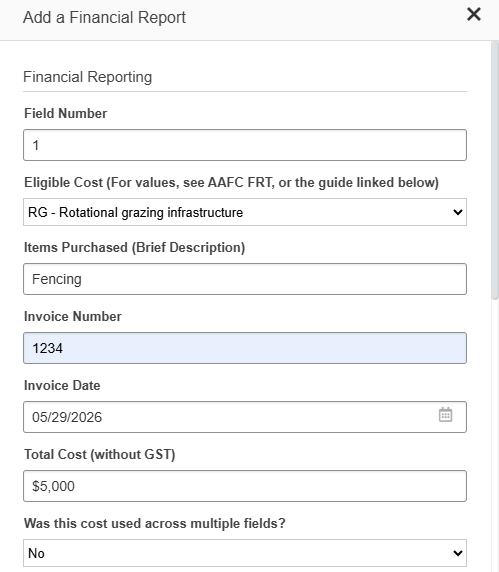
Your financial report should be completed as follows:
- Field Number: Field 1 (must match your map)
- Eligible Cost: RG – Rotational Grazing Infrastructure
- Total Cost: $5,000
Example: Approved for Activity Across Multiple Fields/Plots
You applied and were approved for:
- Activity: Intensive short duration grazing (RG – Rotational Grazing Infrastructure)
- Field: Field 1 & Field 2
- Approved Funding Amount: $10,000 total
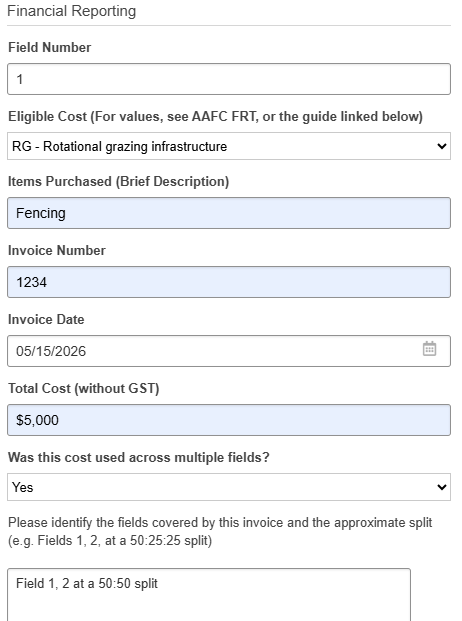
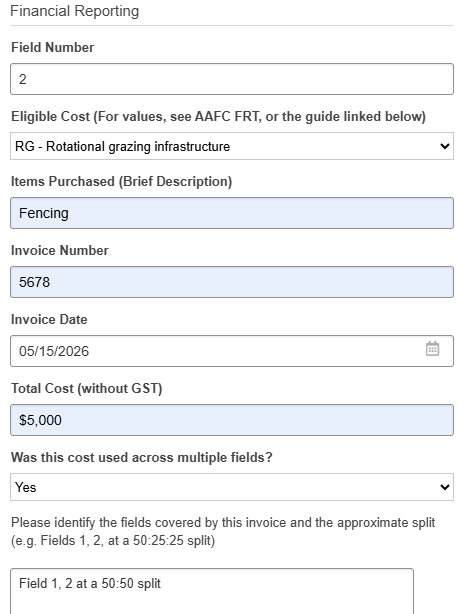
Because the activity applies to two fields, you must split the cost proportionally:
- Field 1 – RG-Rotational Grazing Infrastructure – $5,000
- Field 2 – RG-Rotational Grazing Infrastructure – $5,000
Funding Acknowledgment
What is Funding Acknowledgement?
Funding acknowledgement is exactly what is sounds like, acknowledging the funders that are making your project possible. It’s important to the program funders that funding is appropriately acknowledged, and credit given on any public communications.
Not all projects produce materials that require funding acknowledgement, but if you make a social media post, newsletter update, media release, or other public project communications, the material must be submitted in advance of publication for review and approval. This includes any reports or publications you may complete. Not sure if you need to submit something? Contact communications@iafbc.ca for clarification.
Communications materials must be submitted to the IAF Client Portal at least 10 days prior to being needed. The approval is granted by the Ministry of Agriculture and Food, with the process being facilitated by IAF.
For a downloadable PDF of the funding acknowledgement requirements, see the resources section.
Funding Acknowledgement Process
Design
Design project materials, include appropriate logos and/or credit line.
Submit
Submit your materials to IAF through the client portal at least 10 days in advance. IAF submits to funder for review.
Feedback
IAF will provide you with the feedback received from the funders. If required, you may need to edit your material and re-submit for approval.
Approval
Once the material has been approved by the funder IAF will notify you to confirm that the material is approved for use.
Distribute
Once the approval has been given, you’re free to use the materials.
Funding Acknowledgement Requirements
Funding acknowledgements typically include logos (graphic identifiers), a credit line (written statement), and a disclaimer statement. Typically, the acknowledgement appears near the front of a report or publication, at the bottom of the table of contents, on an acknowledgement page or similar.
You must submit proofs of all communications materials in advance of being made public to IAF’s Communications Team. The communications team is here to help with questions about requirements for each type of material.
Reminder: All materials require approval by IAF prior to printing/production/distribution.
General rule: Logos must appear on communication materials. If it’s a report or publication you may also need a credit line and/or disclaimer statement. When using a government logo you must complete a third-party use form. There are also extra things to be added if the materials is going on social media.
- Logos
- Credit Line
- Disclaimer
- Social Media
- Videos & Presentations
- Reports & Publications
- Public Announcements
The logos (aka. Graphic Identifiers) must be used on the majority of communication materials. This includes newsletters, event invitations, press releases, announcements, public reports, advertisements, flyers, posters, brochures, and related communication materials.
Whenever the Province’s logo appears, the user must also complete and submit a Third-Party Use form for approval. This should accompany all materials submitted for approval that contain the Province of BC’s logo.

Need the logos? Please refer to the resources section below. There you will find a link to download a .zip file with a variety of logos you may require. If you are unable to download a .zip file, please contact the Comms Team and we’ll forward you the logos.
In addition to the logos, the credit line should also be included in reports and other publications.
For brochures, posters, or displays, a written statements may not be required. The Comms Team can clarify prior to development, or upon submission of materials for approval.
Credit Line:
This [project/publication/report/event/etc.] was funded by the Climate Agri-Solutions Fund. Funding for the Climate Agri-Solutions Fund has been provided by Agriculture and AgriFood Canada through the Agricultural Climate Solutions – On-Farm Climate Action Fund.
Disclaimers statements are required in reports and other publications, especially when they contain recommendations and opinions. Typically, we recommend this statement appears near the front of a report or publication, at the bottom of an acknowledgement page, with the logos and credit statement at the end of a video, or similar.
Disclaimer statement:
Agriculture and Agri-Food Canada and the Investment Agriculture Foundation of BC are pleased to participate in the [production/delivery] of this [project/publication/event, etc.]. We are committed to working with our industry partners to address issues of importance to the agriculture and agri-food industry in British Columbia. Opinions expressed in this [report, publication, etc.] are those of [organization name, the authors, etc.] and not 2 necessarily those of the Investment Agriculture Foundation or Agriculture and Agri-Food Canada.
We understand you may be interested in sharing your project funding or details on your social media accounts. This action constitutes a ‘public announcement’ and requires advanced approval. Contact the Communications Team for additional details on project communications via social media.
On social media you are also encouraged to tag Agriculture and Agri-Food Canada (AAFC) in your posts. You may also be required to use the logos, depending on the type of image you share. Plain photos do not require logos, graphics with images and text do. A table below shows the appropriate tags to use by media platform.
| X (Twitter) | |||
|---|---|---|---|
| @AAFC_Canada | @CanadianAgriculture | @cdn_agriculture | @Agriculture and Agri-Food Canada |
Please submit ALL social media content relating to your project to the IAF Client Portal prior to posting for approval. If you will be doing many social posts, please contact us and we will work with you to approve a social media campaign, rather than every individual post.
You are required to have the Logos, Credit Line, and Disclaimer in your video or presentation. The three components should be on a single acknowledgement slide at the end or beginning of your video or presentation.
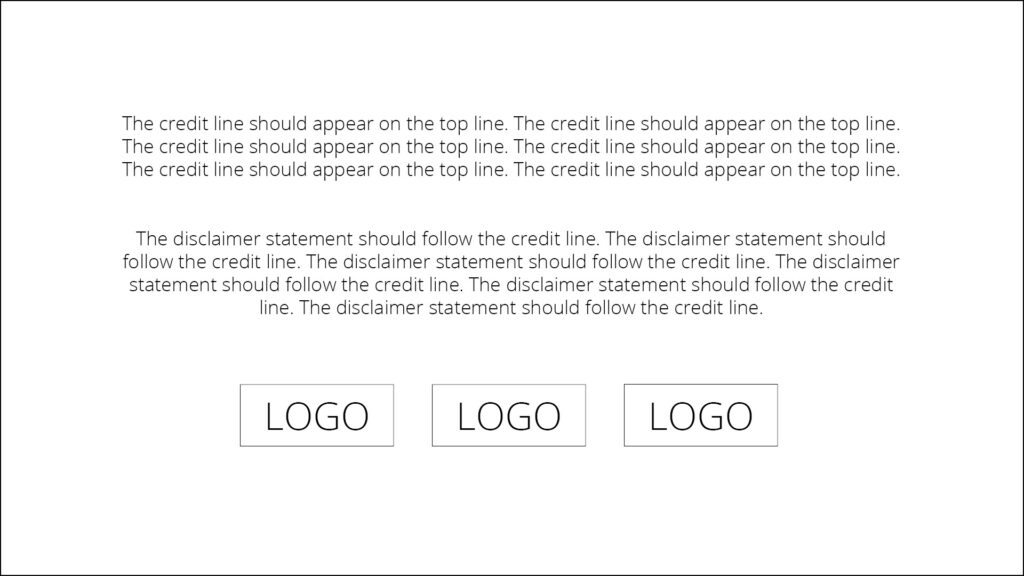
You are required to have the Logos, Credit Line, and Disclaimer in reports and publications. In select cases the logos may be omitted due to space or formatting requirements. If you have questions about how to acknowledge funding on your materials, please reach out early to IAF Communications.
For most reports and publications, a funding acknowledgement page is included near the beginning of a report. This will contain the credit line, disclaimer, and logos.
An event or project announcement is considered a ‘public announcement’ and requires advanced approval. All event material should be submitted together as one approval. This may include an event poster, a registration page, and social media posts.
Announcements such as news releases should be submitted as early as possible. Our funders require additional time to review announcements, especially if you are requesting a quote.
Submitting Materials for Approval
All materials must be approved in advance. It is important to submit materials well in advance of your distribution deadline, as it can take some time to review. We recommend you allow yourself 10 business days for approval, as IAF works with the government funder to ensure acknowledgement is appropriate.
How to Submit Materials Via the IAF Client Portal
To upload a material for review:
- Visit the IAF Client Portal and log into your account.
- Navigate to the Funding Acknowledgement section of your project (on the Project card, select Active).
- Scroll down to the Funding Acknowledgement section, click the ‘green plus’, complete the information, and upload the related document or material.
- When you click SAVE, it will automatically be submitted to the IAF Team to begin the review process.
The status of your request is available in the IAF Client Portal, on the left side near the bottom you will see a Funding Acknowledgement section. The section lists all your request under review, requiring your attention, approval and declined. You will receive an email to your inbox when updates are made.
Learn how to submit material:
Resources
Funding provided by:

Funding for the BC Climate Agri-Solutions Fund has been provided by Agriculture and Agri-Food Canada through the Agricultural Climate Solutions – On-Farm Climate Action Fund.